Specifications Plugin
The Specifications Plugin traces requirements of provided modeled specifications. It does this through the spec-csv command, which generates a *.csv file for a req-spec which traces its requirements.
Spec-Csv Command
aac spec-csv architecture-file.aac output_directory
Arguments
Architecture File
The AaC file containing the req-spec and req definitions for a system, sub-system, or component.
Output Directory
The directory in which the *.csv file(s) will be generated.
Help

Plugin Usage Example
An Architecture File, architecture_file.aac, contains the following definitions:
req_spec:
  name: Subsystem
  description:  This is a representative subsystem requirement specification.
  requirements:
    - "SUB-1"
  sections:
    - Other Requirements
---
req_spec:
    name: Other Requirements
    description: Other requirements
    requirements:
        - "SUB-2"
---
req:
    name: SUB-1
    id: "SUB-1"
    shall: When receiving a message, the subsystem shall respond with a value.
    attributes:
        - name: TADI
          value: Test
---
req:
    name: SUB-2
    id: "SUB-2"
    shall: Do things.
    attributes:
        - name: TADI
          value: Test
---
req_spec:
  name: Module
  description:  This is a representative module requirement specification.
  requirements:
    - "MOD-1"
    - "MOD-2"
---
req:
    name: MOD-1
    id: "MOD-1"
    shall:  When receiving a message, the module shall respond with a value.
    parents:
        - "SUB-1"
    attributes:
        - name: TADI
          value: Test
---
req:
    name: MOD-2
    id: "MOD-2"
    shall:  When receiving a message, do things.
    parents:
        - "SUB-2"
    attributes:
        - name: TADI
          value: Test
If you would like to generate a CSV file tracing the requirement relationships in the current directory, you would execute the following command:
aac spec-csv architecture-file.aac ./output
Which would return this in the command line:

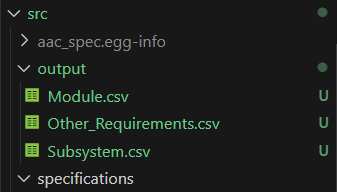
The successful execution of the command would generate the following three CSV files with the parsed content:
Module.csv:

Subsystem.csv:

Other_Requirements.csv:

Definition Type References
The two root types of definitions spec-csv accepts are req and req_spec.
req_spec Definitions
req_specs are the specification definitions. spec-csv will generate a CSV file for each req_spec provided by your architecture file, with a row for each given requirement in the requirements field.
req_spec Example
req_spec:
    name: specification_name
    description: Description of Specification
    sections:
        - Section_Specification_1
        - Section_Specification_2
    parent_specs:
        - Parent_Specification
    child_specs:
        - Child Specification
    requirements:
        - "REQ-1"
        - "REQ-2"
In the above example, all fields except for name are optional fields. The sections, parent_specs, and child_specs fields all take the name of another req_spec definition, and the requirements field takes the id of a req definition.
req Definition
reqs are the requirements of req-specs. In the generated CSV files, there will be a row generated for each listed requirement.
req Example
req:
    name: requirement_name
    id: REQ-2
    shall: The Requirement Statement, which may reference a provided parameter with {req_parameter}
    parents:
        - "REQ-1"
    children:
        - "REQ-3"
    parameters:
        - name: req_parameter
          value: example_value
    verification_method: TEST
    attributes:
        - name: TADI
          value: test
In the above example, the name, id, and shall fields are required. The others are optional. The parents and children fields take the ids of other req definitions. The verification_method field is an enum that takes one of the following options: ANALYSIS, DEMONSTRATION, INSPECTION, or TEST.